Optimizing a site for users and search engines: LoriTironPandit.com

Maintenance note: if you tried to download the free PDF guide to writing deep POV and the link didn’t work, it’s now fixed. Thanks to everyone who notified me about the broken link!

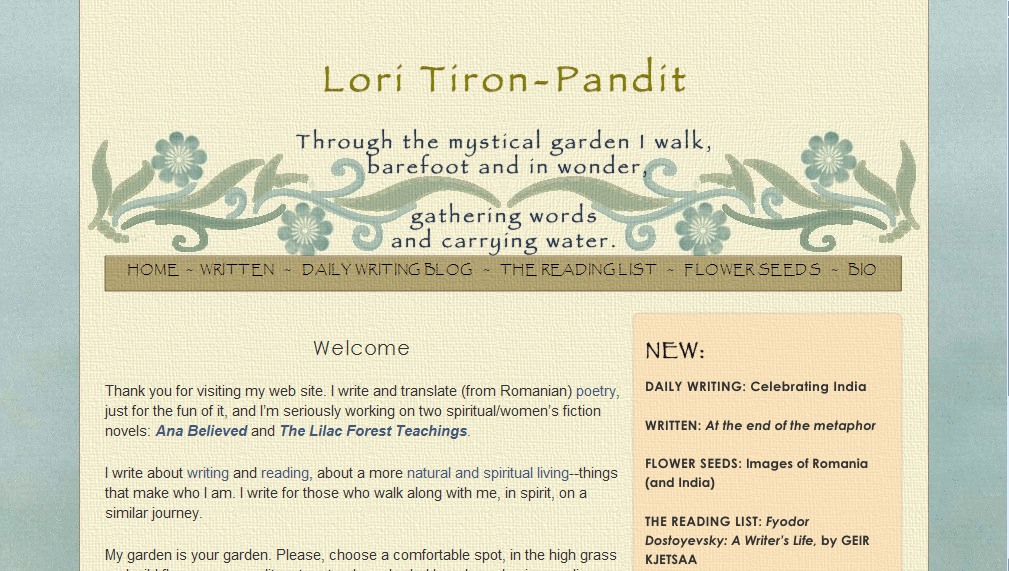
Today we have our third website review. We’re looking at Lori Tiron-Pandit‘s beautiful site. Both Katie and I thought her site was very well done—from the design to the writing of the pages, Lori has done a great job of creating her site. But Katie and I also found a number of technical issues that might be holding her site back. So there’s going to be a lot of technical advice here—be forewarned!
Jordan’s comments

Hi Lori! Like I said above, I think you’ve done a great job with your site. But something about the code is keeping your site from performing well in search engines—or even appearing at all, in some cases. So there’s a lot of information on that, though I’m afraid I might not be much help.

Pages

You have your email address listed and linked on each page of your website. That’s good—but I’m worried some visitors might not think to scroll down. (This is why I recommend having a specific contact page, so visitors always know where to find your contact info.)

On your Written page, you have original and translated poetry, as well as links to your novels in progress. If you’re using your website primarily to position yourself as a poet and translator, this may be fine. But if you’re using your website to position yourself as a fiction author, I would feature those links more prominently on the Written page—maybe in the paragraph above the poetry (with maybe a log line or other one-sentence hook), or at least “above the fold” (in the area of the screen you can see without scrolling down).

Your about page does a great job highlighting your professional qualifications and credits, with a nice sidebar on your life to make it personal.

Aside from the blogs, I don’t see any social media on your site. However, on your daily writing blog, you do feature your Twitter profile in the sidebar. I might move that up a little. I would definitely recommend moving the “Subscribe” box up to the “above the fold” area to encourage visitors to subscribe.

Your site is polished, easy to read and easy to navigate. Other than possibly your contact information, your visitors should be able to find most of what they’re looking for. The names of your various pages may be a little cryptic—I can guess what “Written” links to, and “Daily Writing Blog,” “Reading List,” and “Bio” are easy to understand, but I don’t really know what to expect when I click on “Flower Seeds.” However, on that page you do have an explanatory paragraph that explains the purpose of the page.

You have multiple blogs on your site, but you do a great job of highlighting their content on the front page and cross-promoting among your blogs.

Search engine presence

Your search engine presence is a mixed bag. Bing doesn’t list any of your sites in the top ten, though they have mentions of you on various guest posts and comments around the web.

Yahoo’s top two results for your name are from your daily writing blog (and the followers page for your blog is #4). Your bio is #3, but your main website doesn’t appear there. The rest of the top 10 results appear to be your profile on various social networks.

Google, like Yahoo, has your top two results from your daily writing blog, your Twitter page and various mentions of your name on guest posts, comments and forums to round out the top ten.

This means only one of the major search engines has any page from your website in the top ten results for your name.

Part of the problem here is that, of the pages on your website, only two pages on your domain have content that search engines can read. (Your daily writing blog has content search engines can read, but it’s on the blogspot.com domain—you could move this to blog.loritironpandit.com with Blogger Custom Domain, if you want—every little link helps!)

(You probably know this already, but for everyone else:) Search engines are kind of stupid. They’re only really good at text. (They’re getting better at Flash, and they’re working on images and video, but that’s mostly from context.) Search engines use programs called “spiders” to crawl the web, read the content, and return what they find so the search engine can index it and call it up later. Here’s what a spider sees when it reaches your Flower Seeds page:

flower seeds home written daily writing blog the reading list flower seeds bio flower seeds is about my family s journey toward a simpler more natural more aware life it s about reconnecting with our environment with traditions that have been passed to us from our romanian and indian families and with rituals that we create together blog summary widget archive archive copyright 2008 2009 lori tiron pandit all rights reserved [source]

And that’s it. Visitors can read the rest of the content—all of the blog entries—but search engines can’t find the text or the individual post pages.
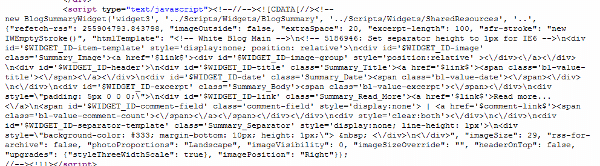
What search engines see instead of a blog 🙁

After some serious digging, I think I might have found the problem. I believe it’s either one of two things:

  1. Rumor has it that with your website builder, iWeb, the font you choose—or even the version of the font you choose—can affect how your site is coded. iWeb makes some fonts appear as text in the code, while others (or maybe just certain versions) appear as images (i.e. unreadable to search engines) in the code.
  2. The more likely option: you may be using a widget to import your posts to the pages. The widget uses JavaScript to bring the summary entries to the page—yet another thing search engines aren’t great at yet (though they’re working on that one, too). And if that’s the case . . . wow. I really don’t know what to tell you. I don’t know what alternatives iWeb offers, but I recommend exploring them. If there’s no other way to do this, you might also think about moving to another platform. (I can imagine how you’d implement the same site design on a WordPress installation, for example, and I came across lots of resources for transferring, and I know there are cheap HTML to WordPress theme services.)

You can also add meta data like I’ve recommended for Livia and Eileen—here’s a page on more tips on getting a site search-engine friendly in iWeb.

To help search engines find your site, get links with your name as the text (“anchor text”). You can do this through guest posts and comments, like you’re already doing. One last suggestion: if you’re planning to use your site to attract future translation gigs, you could set up a page (maybe “under” Home or Bio) devoted to Romanian translation—with “Romanian translation” in the title. When you try to get links for that page, use “romanian translation” (or whatever term you think people would use to search for those services) in the anchor text.

Kathleen’s comments

Lori,

Your site is beautiful! The applique-looking flowers and scrollwork carry a note of something ethnic, and while I didn’t immediately think “Romanian,” I DID want to look and see what you wrote. (Of course, I knew you were a writer. I think that would still have been clear to a wandering visitor, since both your quote, with “gathering words,” and your links menu, portray that information.)

Your intro paragraphs also feel like a naturally-spoken welcome, and your in-text links are also naturally well done. ie: You didn’t say: “You can visit my blog or read what I’ve written,” etc. Those always have the effect of making me NOT want to click on either link. Done the way you did, I’m curious, but the links aren’t shoved in my face. Well done!

What would I recommend? Well, quite frankly, you’ve done extremely well! Your pages present information in a way that a visitor and reader feels encouraged to read. Your text is easy to read. The colors are relaxing. And I LOVE your author photo. It’s not your standard “author photo” but it really has character, both in the shot and the unusual shape of it, and that character really reflects what I see on the whole site.

Once you sell a book, you’ll want to redo your pages to subtly guide your visitors toward a page where they can buy your book [and she wrote this review even before I said that yesterday!] . . . but that’s not the case now, and I wouldn’t change it!

Page loading times

The only issue I came across was that a number of your pages loaded quite slowly. That turns away people on slower modems. (I’m on cable.) I was wondering if it was your website server having problems or my own connection having problems . . . until I saw the size of your background images . . . and realized that you have different background images for every page.

That’s what’s slowing down your page loading times so much, and it’s ALSO upping your website bandwidth (which you’ll be charged more for, once your traffic gets high enough).

Let me go through a few guidelines for anyone designing their own website . . . especially since I’ve recommended more images to many of the people I’ve done reviews for.

Text loads fast. Images are what slow down loading times for pages. Images are a large part of what gives your site character, however. The trick is to find the balancing point.

Large images can take a while to load, and lots of small images add up. So the goal is to not use images for anything that can be done without images (such as text menus, solid color borders, and spacing) and to keep the images you MUST use as small as possible.

Lori . . . your blue background image is as wide and long as an entire page. Your tan paper-looking background is also that wide and long. Your header image is ALSO almost that wide, and it’s two inches long. That means there are three layers of images at the top of your site, all of which are slowing down your bandwidth, even though only one is visible.

Are you aware that your site can look EXACTLY the same, if you find the repeating marks in both background images and crop them down? Both background images could be about 3% the size that they are right now. Your blue background could be a 1″ by 1″ square (maybe even smaller), and it would still repeat across the entire page the same way the large one currently does . . . except the browser would only have to download a TINY image, instead of a huge one.

Same with the yellow background. It could be only 1″ x 1.” Take the border edge off and change the code so that this section of the page has a 1 pixel border down both sides, in the same color it currently is. Your tiny image will then repeat and fill the same area and look exactly the same as it does now.

Your header image should be cropped to just above the text…then use “padding” in the code to scoot the image down (though I wouldn’t scoot it down quite as much).

(I’m not sure what size the orange background is on the bio, since I couldn’t quickly find it in your code. It should be small, too. Ditto with the brown background behind your menu.)

Next…

Site architecture

You have a separate folder set up for each page of your site. This means that every time someone visits a new page, the SAME IMAGES are downloaded again. Instead of organizing your site this way, you should have one image folder. Every page pulls the images it needs from that one folder. That way, when a visitor moves to a page that uses the same image, the browser KNOWS it’s the same image and doesn’t download it again. It just shows the one it downloaded for the last page.

So typically, we design a site so that all of the pages are in the root (main) folder, and we have a sub-folder called “images.” All of the images are in that, and when we want to put an image on a webpage, we code that the image is at: url(images/background-image.jpg). It’s only on really REALLY large sites that we create additional subfolders for sections of the site, because that makes the coding more complicated. And simple is usually better. 🙂 [We don’t know how feasible this would be in iWeb, but look around to see if you can change the CSS and code to refer to a single image source.]

Optimizing load times

Finally, if you MUST use an image that’s big (like your header), do a little trial and error. Save it as a .jpg and as a .gif. Run the .gif image through the “Image Optimizer” that’s free to use here: http://www.netmechanic.com/GIFBot/optimize-graphic.htm, and see if any of the faster-loading images look just as good as your original. Compare the size of them with the .jpg you saved, and used the one with the smallest kilobytes. Sometimes the .jpg will be smaller, and sometimes one of the reduced .gifs will be smaller. But this way you know you’re loading your design as quickly as you can.

And when you’re done (or maybe before you’re done), have NetMechanic check your page. It’s free, but it’ll tell you just how fast (or slow) your page loads. http://www.netmechanic.com/products/HTML_Toolbox_FreeSample.shtml

Happy writing and designing!

-Katie, KatieDid Design

We hope this helps—while the technical issue here may be unique to Lori’s site, we also hope that everybody can take away some principles of design and accessibility to help with your sites!

What do you think? Do you notice page load times? What do you think Lori can do to take her site to the next level?

Photo credit: File folders by Aya Otake

Five more things an author’s website must do

This entry is part 2 of 5 in the series Aspiring author websites

Last week, we started to look at four things an aspiring author’s website must do, kind of a corollary to my guest post on Nathan Bransford’s blog, seven things an aspiring author’s website must have. We looked at the “get ready” and “get set” phases—gearing up for submitting your work for publication.

This week, we have a few things that all authors—aspiring or not—should be doing with their websites, as well as just a little advice for soon-to-be published authors (like my ‘twin,’ Kiersten White, who was just signed to a three-book deal in a pre-empt! Congrats!). There are volumes more to say on what an author’s website should do and have and be, but we’ll stick to these few today.

The 1-2-3 phase: attract interest for your book

After your book has been accepted for publication, your website is an even more powerful tool. If you’re still solely on a blog on a free domain (i.e., ilurvewritin.blogspot.com), it’s time to buy your own domain, preferably YOURNAME.com. And along with a new domain, this is a good time to upgrade to a “real” website—keeping your blog, of course, but also hosting a stable website. Ideally, the blog and the website design will be integrated seamlessly.

In this phase, it’s time to focus on that book to attract as much prelaunch interest as you can.

How can you do this? There are a few things you’ll want on your site before the book launches to help drum up interest:

  • An awesome, engaging description of the book
  • The cover (so people will recognize it in a bookstore)
  • An excerpt, preferably from that incredibly intriguing beginning (with permission from your publisher)
  • A link to your book on Amazon—hello, pre-order! (Also, you can use an affiliate linkhow to sign up as an Amazon affiliate] to make a few extra pennies off any sales).
  • Your book trailer, if you’re doing one.
  • Anything else that will make people want to run to the bookstore on launch day!
  • Send author friends (especially ones with newsletters) a short paragraph about your book, with links.

You can also look at the terms people are advertising and searching on in search engines, to see if any of those people might be interested in your site—then use those terms (“keywords”) on your site, in page titles and content, in natural language. (You’re a writer, right? So write!)

The Go! phase: sell your book

As with the 1-2-3 phase, your website can be a major vehicle for selling your book (and your backlist, if you have one). Candace E. Salima gave a great presentation on this subject at a conference I attended in April.

How can I do this? Well, along with the above ideas, it’s also a good idea to spread the word on other websites through advertisements, reviews, releases, contests, and other publicity.

But that’s not on your website. On your website, always, always, ALWAYS have a purchase link. Have “bonus features” to your books on the website—recipes, play lists, deleted scenes—anything you think will interest your readers.

Also, make your website somewhere that people will want to come back to—do something for them, reach out to them (see building a community), be accessible. Even if they’ve already bought your book, they’re still your customers, your readers, your fans, and striving to build a relationship with them (individually and collectively) can help sustain you, both emotionally and financially.

Always: sell YOU

Your website is also a great way to sell you—and I don’t mean prostitution. I mean building a brand that will lead to agents, editors, fans, loyal readers, subscribers, fame* and glory* (*results not typical). If you have something to say, some kind of message, that’s part of your brand. If you write in a specific genre, that’s part of your brand.

How can I do this? Make your site professional and consistent—use the same layout, color scheme, graphics, etc. on each page. If you have a theme running in your published books (especially their covers or color schemes), go with it on your website.

On your site (perhaps the about page), talk about what draws you to your genre or your message. Encourage your visitors to share their stories of why they’re interested in the same topics.

Also, talk about or at least hint at future projects to keep your readers—your potential customers—interested. If it’s feasible, think about running a regular newsletter (monthly, bimonthly, quarterly). You can keep your most loyal, interested fans updated on your progress, offer special contests, and interact with them.

Have photographs of yourself (for visitors and high quality ones for media contacts). Feature other peoples’ interviews with you (or interview yourself). Allow people to get to know you (somewhat—we all need our privacy, and we don’t all need to know if you’re wearing clean underwear right now!). This goes hand in hand with the next point, something you should always strive for with your author website:

Always: build a community

A community based around a blog, forum or website means that people feel welcome. People can participate and interact with you. People come back.

How can I do this? Building a community around your blog or website can be as simple as encouraging discussion, responding to comments and writing on requested topics. Whatever you do with your website, interact with your visitors. Even if you don’t have a blog, you can interact with your website visitors—host a forum or weekly chats to connect personally with them. Use your email newsletter to appeal to them.

Always: build your platform

If you’re lucky enough to have a unique selling proposition just by virtue of who you are and/or what you do, bank on that. If you’re a computer engineer writing about high-tech computer hacking, tout those qualifications on your site. Once you’re published, you can also use that platform to launch yourself into public speaking opportunities on related topics—building your brand and your platform in the real world.

How can I do that? Feature your qualifications on your about page—maybe even write a “sub” page to your about page, just devoted to that. Include it in your FAQ (if you have one). Create an FAQ around that industry. List your speaking engagements on related topics, and make it clear you’re available for such gigs. (What would you speak on? Something related to your platform and your writing or research—if you’re writing fiction on high-tech computer hacking, you could speak about how to protect yourself from hackers, for example.)

Always remember: your website will be the major way you’ll interact with most of your readers and potential business associates. Use it wisely!

Next week, we’ll take a look at an easy way to set up a website!

What do you think? How else could you do these things on your website? What else should an author’s website do?

Photo credits: excited reader—Chris Johnson; bookseller—Herman Brinkman; bricklayer—Jovike

Prizes all around!

This entry is part 11 of 14 in the series Deep POV

Today’s the big day: the Blog RSS contest conclusion. Did you see the secret message?

Well, someone did. <drum roll please>

Andrew Rosenberg

will get The Power of Point of View by Alicia Rasley AND Writing the Breakout Novel by Donald Maass.

But wait, there’s more!
Livia King, neuroscience grad student, writer, intrepid volunteer and very very soon to be bride, wins How to Write a Damn Good Novel: A Step-by-Step No Nonsense Guide to Dramatic Storytelling by James N. Frey.

AND:
Deb Smythe wins How to Write a Damn Good Novel, II: Advanced Techniques For Dramatic Storytelling by James N. Frey.

Thanks to everyone who entered, and congrats to our winners!

Note to prizewinners: if you already have a copy of your prize, then we can talk substitutions. Email me with your shipping information: jordan (at) jordanmccollum.com

And there’s still more!

Free Deep POV guideDon’t be disappointed if you didn’t win one of our fabulous prizes (I know it’s hard, but please try.) I have something for everyone.

Our blog series on deep POV has come to a close, but there’s always more to learn. I’ve assembled the posts from the blog series into a free PDF guide to deep POV—with bonus features not found in the blog series.

All our guides will be available on the new Free Writing Guides page.

What would you like to see for future contests and prizes?

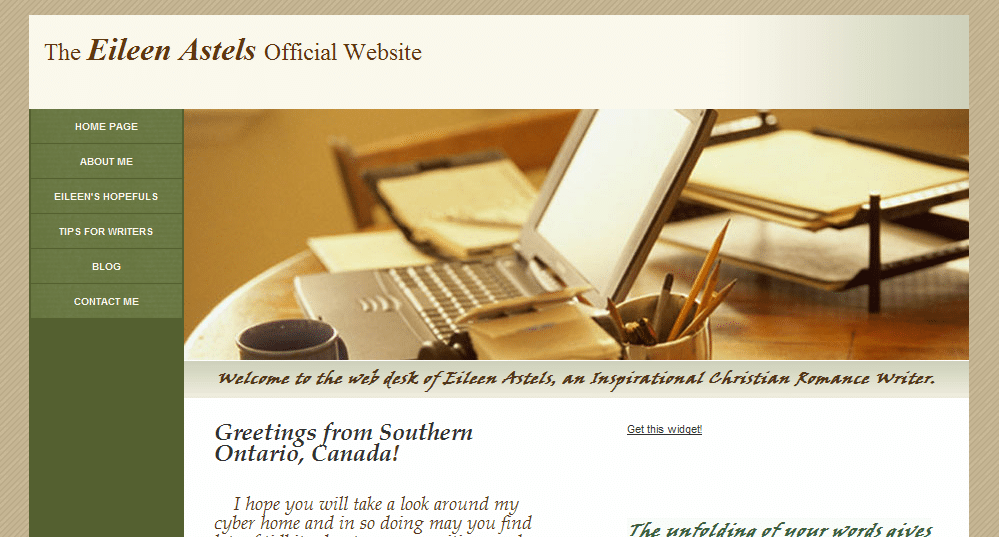
Get set phase website and blog review: EileenAstels.com

Another website review today! I feel like I’ve known Eileen for a while, since I’ve seen her around the comments of other blogs (like Kaye Dacus‘s and Nathan Bransford‘s) for over a year, but we haven’t really “talked” until she came to this blog (woot!). Now she thinks I’m a Superior Scribbler (why, thank you!), and she volunteered for the next website review with her site, EileenAstels.com. Katie and I both also looked over her blog, EileenAstels.blogspot.com, too.


Eileen’s website

Jordan’s comments

I see from your blog that you’re just entering the “get set” phase— you’re submitting to editors and agents now. Congratulations (and good luck)! It’s important that visitors can figure out what your site is about and what they’re supposed to do once there there. Your site looks pretty ready—it’s professional, easy to navigate, and the left navigation makes it easy for your visitors to find the important stuff on your site.

However, your genre and even the fact that you’re a writer almost seemed “buried” below the header. (It was several minutes before I saw it there.) You should use that line of text or something similar right under your name at the top as a tagline to make your purpose, niche and genre apparent when someone stumbles across your site.

Individual pages

In this phase, your contact page is more important than ever. So woot on already having a contact page! If you want, you might also use the form that GoDaddy can install on a contact page. (If you’ll recall, this page is the #1 thing an aspiring author’s website must have.)

You might consider relabeling “Eileen’s Hopefuls.” I guessed what you meant, but it almost sounds a little sad 😉 . Plus, it could be clearer—I knew what I was looking for when I came to your site. Not everyone will. On the plus side, I like your organization here—presenting your books as a planned collection or series. It looks like some of your books’ statuses need to be updated (books 3, 4 and 5).

I’d also recommend that you expand the book descriptions here into full “pitches” like you’d present in a query letter, especially for the later books (because the agents/editors will have already seen the pitch for the first book). It’s totally up to you, but you could think about putting a short excerpt—maybe five pages—on your site, too.

I might reword or delete the first sentence of the last paragraph on the Hopefuls page—it almost sounds like you’re planning on just using the series as a warmup exercise.

Your about page is personable and professional.

Search engine presence

Your search engine presence is good. Your site is #1 in Google and Bing and #2 on Yahoo for [Eileen Astels]. Your blog is #1 on Yahoo, #2 on Google and #6 on Bing for [Eileen Astels]. Other sites in the top ten for your name are the widget for your blog, Facebook, Afictionado, and Amazon.ca. While those are fine, it couldn’t hurt to seek out opportunities to get your name out there more—like you’re doing through coblogging, comments and guest blogging. (Be sure to get the most out of guest blogging if you do it.)

A few other tricks you could do to help:

  • Change the <title> element on your home page to “Eileen Astels Official Website” or “Eileen Astels – Inspirational Romance Author” or something like that. Right now, if I were to bookmark your home page or minimize my browser while viewing it, it would be described as “Home Page.” I’d lose that in my bookmarks. Plus, it’s helpful to have a descriptive title for search engines to understand what your homepage is about. (I don’t use GoDaddy for building sites, but I believe this is under “Page title.”)
    • However, if changing this changes the title of the page on the left-hand side, see if “Eileen Astels Home” or just “Eileen Astels” will fit.
  • Use headers to organize and emphasize your text, rather than just using size/styles. If you look at the source code here, you’ll see that “Jordan McCollum” is in a <h1> tag—a header (top level) tag. That indicates to search engines what the page is about. Use header tags (h1, h2, h3) to organize your text hierarchically. Test this to see what they look like, but in most designs the header tags are large and bold. (Technically, this technique seems to be losing a little power, but it can still help.)
  • Use meta descriptions to control the “snippet” in search engines. Right now, search engines are showing “The Eileen Astels Official Website. Your Subtitle text … Welcome to the web desk of Eileen Astels, an Inspirational Christian Romance Writer. …” But if you have a meta description that matches a query, they’ll show that instead (i.e. without “Your Subtitle text”). You might have to insert them in HTML, like I told Livia).

Social media & your blog

For whatever reason (I’d guess browser incompatibility, but I’m not sure), I don’t see the widget showing up on your homepage. I see you’re on Facebook (on your blog) and Twitter; you could consider having widgets for those on your website, too, in the sidebar, on the main page or on the contact page.

Your blog looks to be a good mix of appealing to and networking with fellow writers, sharing your love of literature and sharing your life in an appropriate way. It looks like your content is fun, interesting and useful, and with 50+ followers and twenty-something comments on most posts you’ve clearly built a community around your blog.

My only advice here would be to set up your blog to be hosted at http://blog.eileenastels.com. You can do this through Blogger and GoDaddy, your domain registrar, without changing anything else, really. Setting up Blogger Custom Domain is a little bit technical, but not very hard.

Why do you want to do this? Because every link to your blog is a “vote” for your site in search engines’ eyes. The more votes you have, the more authority search engines think your site has. But if these links point to http://YOURBLOG.blogspot.com, it’s BlogSpot getting all that authority. If you move your blog to blog.eileenastels.com, the votes now all go toward your domain (which many professionals believe will give your site an overall lift—and since Blogger will redirect your links, it can’t hurt!).

This might seem like a lot, but really, you have a good site set up so far and a few tweaks could take it to the next level.

Katie’s comments

Dear Eileen,

Nice to meet another Christian romance writer! 🙂

Your site uses a common layout, but it’s still tasteful, in relaxing colors, and is easy to navigate. Those may seem like simple compliments, but they’re extremely important. (And many people get them wrong.) So congratulations! It is also a perfectly-functioning site, as it is. So these thoughts are just things to consider the next time you feel like doing a re-design.

What would I recommend on your site? Well, to me, there are three main issues.

Web-safe fonts

The font that you’ve chosen for the green bar (that says, “Welcome to the web desk of . . .”) and the scripture verse is very hard to read. At least, it is on my computer. (This is the only thing that might NOT be perfectly-functioning on other computers. Read on to understand why.)

Here’s the thing about using fonts other than Arial, Courier, Georgia, Times, and Verdana . . . you have absolutely no guarantee that your visitors have the same font installed on their computer that you do. What does the browser do if you’ve told it to render “Viner ITC” and the visitor (like me) doesn’t have it? The browser picks one at random and renders the text in it. So the visitor is totally stuck if the browser picks “Webdings” or some illustrative font that renders a picture for each letter. (I have no idea what Viner ITC looks like, so I don’t know what font YOU see on your computer. I also don’t know which, of my 100+ fonts, the browser picked . . . I just know it’s not easy to read.)

The only way to avoid this is to stick to the very, very short list of fonts that are pre-installed on all versions of all operating systems. (Google them, if you’d like.) If you want to do something in a font other than that, you have to use a graphics program to make an image of your text in that font [That’s what I did for my header when I fell in love with that font—Jordan]. (And then make sure you use an alt tag for that image, so that blind Internet users’ text-reading programs can still tell them what the text says [And also search engines!—Jordan].)

While I’m on fonts . . . I’d recommend un-italicizing the rest of your text as well. It’s harder on the eyes, and therefore makes it more likely that your readers will click away without reading it. (You’d be surprised how little a website visitor needs to click away! And most of it is subconscious, too, so you can’t argue with it.)

Conveying your genre in the design

Your header image portrays writing . . . but not inspirational romance. I’d see if you can find something a little more romance-y. Adjust your background colors, if needed, to match . . . but keep them tasteful and relaxing! Also, your header image stretches farther down the page than your navigation menu. That looks a little . . . “off” to me. Maybe see if you can add a few other little items of interest in that bar on the left. Do you have a twitter feed? How about a favorite scripture? Or an image that coordinates what your header? Maybe you can install a widget that will automatically post the titles to your last five blog posts?

Blog/site transition

Finally, your blog’s overall feel doesn’t reflect your site’s at all. It makes the reader do a double-take and think, “Wait! Did I click on that right? Is this really the same person? It can’t be! No . . . wait, (checking back and forth) that’s the same name, so it must be. Okay. . . .”

You don’t want that interruption. If someone visits one, and then later visits the other, you want them to think, “Hey, this looks familiar! I must have been on this woman’s site before or something.” And actually, your blog reflects Inspirational Romance much more than your site does. Where did you get the background image? Do you have permission to use it on your site as well? I can think of several ways to use it, if you’re interested.

Finally, two other tiny things:
4) Your header bar, with your name in it, looks too long . . . almost like you’ve got a blank line under the text. I’d scoot it up against the top of the browser window (so the brown background doesn’t show) and shorten that up so it’s about half the height it currently is.

5) On your tips, hopefuls, and contact pages, you’ve got a light green background behind the text, that’s covering your gradient image. (It’s not . . . and it looks better . . . on your home and about pages.)

I hope this is helpful to you!

-Katie, KatieDid Design

What do you think? What other feedback would you give Eileen on her site?

The Believer by Stephanie Black – review

Don’t forget! This week is the RSS contest—so be sure to subscribe to JordanMcCollum.com via RSS or email for your chance to win, and keep your eye on the footer of your email or posts in your feed reader!

I believe I’ve mentioned before that I’d like to be Stephanie Black, right? Well, I finally got ahold of her first book, The Believer. Although plot-wise, it’s completely different from Fool Me Twice (my review), I saw some definite parallels in the complexity of the mystery plots.

The Believer deals with a future dystopia where religion is outlawed. The main character, a history professor, has slowly wandered down the path of “treason,” reading unapproved and even (gasp!) religious literature—a crime punishable by life in prison.

As Dr Roshek (which is an anagram of kosher! Am I not clever?) tries to do the right thing, his world begins to fall apart the day that he is arrested for defending a student accused of treason—a stranger—from a brutal attack.

Like Fool Me Twice, the plot is very complex. I was happy that I couldn’t guess the ending of the book—by the black moment, it definitely looked like there was no way any of the main characters would make it out alive. However, the plot wasn’t so complex that I felt lost or overwhelmed—just like with Stephanie’s other book, as the book neared the climax, I could see some things coming (though there were a few surprises!), but only about 20 pages in advance. She did a good job of planting clues, too—in such a way that you could remember them if you’d paid attention.

In a way, this reminded me of All’s Fair by Julie Coulter Bellon—with terrorists insurgents trying to overthrow the government, but mostly because I was all ready to pull out my American Heritage principles to teach just why insurgencies don’t work. Really, as a history professor, Stephanie’s protagonist could have even lectured on these principles himself.

As always, I have to point out anything that detracted from the story for me. Lt. Alisa Kent, a policewoman torn between duty to her country and her conscience, is supposed to be severe, from her coloring and clothing to her mannerisms and speech. But sometimes she came off as more wooden than severe to me.

I’m eagerly awaiting Stephanie’s latest book, Methods of Madness, which is due out this month!

What do you think? Would you (or your writing) benefit from learning about why insurgencies fail? Do you like books to be complex enough to be unpredictable?

Get-ready phase blog review: LiviaBlackburne.blogspot.com

After we looked at four goals of an author’s website (before publication), now we’re ready to start our website reviews. Just as a reminder, my day job is in Internet and search engine marketing. Kathleen MacIver, my co-reviewer, runs KatieDid website design. Our first victim review is of LiviaBlackburne.blogspot.com. Thanks for being the first to step up to the plate for the website reviews, Livia!


Livia’s site

Jordan’s comments

Hi, Livia! If I had to guess, I’d say you’re in the get ready phase—you’re in the process of writing, but you’re not submitting to agents or editors yet.

In the get ready phase, your goal is to build a community around your blog. You can network with other writers (and maybe agents and editors), you can appeal to readers of your chosen genre, you can tout your platform or skills.

So right now, I’d focus on using your blog in one or more of those ways. As far as usability goes, right now, you’re probably okay, but you’ll want to make some changes before you use your blog as a marketing tool or mention it in a query letter.

Your blog can actually perform the functions of a full website if you add a menu bar. On the menu bar, you’d want to link to your about page, contact page and works page, at a minimum. (Your blog would probably benefit from at least the first two right now.) Additionally, you can buy the domain LiviaBlackburne.com and put your blog on it. (If you want to develop a separate website later, no problem—put your blog on blog.liviablackburne.com and you can add your main website at liviablackburne.com later.)

If you do anything now, I would add a way for someone to contact you directly. Yes, we can tweet you, but if we’re not on Twitter, the only other way we have to contact you is through a blog comment—not very private.

Posts and their content

A huge strength of your blog already is your focus on a topic and a niche—a [neuro]scientific approach to writing. In terms of quality, your posts look great! You have really good, helpful content. Generally, however, when you post more frequently, your blog will grow more. Posts are what blogs are for, after all 😉 . Once a week is probably the minimum, and it’s important to be consistent.

If you have trouble coming up with things to write about, you could break some of your future posts into series of shorter posts (you could get four posts out of a post like yours on the power of prologues, for example). Series also helps to build a sense of anticipation among your blog readers—they’re looking forward to your next post.

You can also add more bulleted lists to help make your reading more scanable, if suited to your posts. Pictures, even stock photos, also help to break up big blocks of text and draw in readers (I use sxc.hu and Flickr Creative Commons search to find mine). See the screencap at right to see how photos break up what otherwise looks like a long block of text. (Also, there’s a bulleted list in there; they stand out more when you do them “for real” instead of just throwing a graphic together like that.) The screencap also includes the recommendations I have made/will make about your sidebar.

For a blog that’s pretty young, you’re already getting multiple comments on your posts—woot! You can always try to appeal more directly to encourage blog comments, such as asking discussion questions at the end of the post.

Similarly, you can appeal directly to your readers to become Followers and subscribers.

Search engine presence

Your search engine presence is decent. I think you’re very smart to start using your married name now (and congrats and good luck on the big day!)—changing later would’ve caused a few problems. You have little competition for your name. This blog is #1 on Yahoo and #6 on Google for your name. (#1 on Google is your Twitter page; #1 on Bing is your other blog.)

Unfortunately, I can’t seem to find this blog on Bing. To help improve your rank on Google and get indexed by Bing, look for opportunities for links with your name as the anchor text, like guest blogging, your friends’ blog rolls, etc.

Also, you can sometimes have more control over the “snippet” that appears in search engine results (the description below the blue link) by using the meta description element. The format is:

<meta name="description" content="[description of your site, such as what you have below your blog name]" />

The description you put there will show up as the snippet in search results (if there isn’t a better match for the search terms elsewhere on the page).

Here are some more specific instructions on how to insert header codes in Blogger.

Social media

You’ve done a great job of integrating Twitter with your blog with the Twitter widget in the sidebar and TweetMeme on each post. This goes both ways, since you actively use Twitter and promote your blog posts there (good!). You also promote your subscription options well, though I might recommend moving them above the topics menu (that way we can see the subscribe buttons “above the fold”—in the area of the page you can see without having to scroll down).

I might also move the Twitter widget above the Google ads, but that’s fairly subjective.

In all, you’re off to a good start. A little work on the static pages and posting consistency will get your blog to the next level.

Katie’s comments

Hello Livia!

First, I’d like to say that I find your little catch phrase quite intriguing! What IS a brain scientist’s take on creative writing?

However, this is a website review, so I’ll have to focus my comments on your blog design . . . and frankly, I’m not sure what to say. There’s not really anything to critique, since it appears to be a basic template. A website made from a basic, generic template (99% of the time) is like finding a hardcover book that’s missing its dust jacket (the old kind that had nothing more than a solid color and gold lettering on the edge). There’s nothing to turn you off to the book/site, but you really had to have a compelling reason from somewhere else in the universe to open up that book and start reading, because the book cover itself is offering you nothing.

You do have that little paragraph that explains a little. Now you need to find a design that is the visual interpretation of your concept. A header image/text would help . . . my initial thoughts would be your name long, spaced out (and not too large) and centered, then immediately under it, in a strong technical-looking font, your words, “A brain Scientist’s take on” on the left, leading to “Creative Writing” on the right, but done in a fun “creative” font. This would give a partial “translation” of the text and help show the contrast between “brain scientist” and “creative writing.” (Note: this text would have to be turned into an image . . . check back for the next review for the reason why.)

Then, a background and/or other image here or there that carried that contrasting theme would be fantastic. You’d want something that melds technical/scientific/detailed, with art. (I’d sure have fun designing that one!)

Your layout is fine . . . basic layouts for blogs are often best, since people are there to read content (once they know they’re interested, of course).

So all-in-all . . . you don’t have anything wrong here, but you haven’t really taken any steps toward the two main goals of a website’s design, which are:

  1. Instantly portray what your website is about, and what the visitor will receive if they hang around. (In your case, interesting information that they’re not likely to find anywhere else on the Internet, since the number of brain scientists blogging about writing has got to be extremely small)
  2. Make the site stick in their mind, thereby upping their chances of wanting to come back, coming back, and remembering why they bookmarked it when they do come back.

Feel free to drop me a line if you’ve got any more questions!

-Katie, KatieDid Design

What do you think? Can Livia’s site do more? What advice would you give her?

Photo of book by Marcos Ojeda

Four things an aspiring author’s website must do

This entry is part 1 of 5 in the series Aspiring author websites

Guest blogging for literary agent Nathan Bransford a few weeks ago, I wrote about the seven things an aspiring author’s website must have. But in addition to having convenient features and good appearance, an aspiring author’s website must do certain things to fulfill its purpose, depending on what phase your career is in.

(Side note: I have a blog where I talk a lot about blogging, I reference some posts on my other blog here.)

The get ready phase: networking with other writers

When you’re in the “get ready” phase, you’re actively writing and seeking out other writers, but at present you’re not ready to submit to agents or editors. Since your career is just starting out, your website may just be starting out, too, though it won’t hurt if you already have a fairly well-developed site.

Before you’re ready for publication, your website can help you find critique partners, talk with other writers about writing, explore your genre with other writers, and make the connections that help smooth the path for your career—or at least make a solitary profession a lot less lonely. This is your time to start building a community of writers.

How can I do this? The easiest way to make your website into a networking tool is to make sure there are plenty of ways other writers can connect with you—and often the easiest way to do that is through engaging blog content and comments.

The get ready phase: find your niche

While you’re preparing for publication, it’s also a good time to get your web presence ready—especially to find the niche where you’ll fit in the blogging and publishing (and publogging?) worlds.

How do I do this? To find your blog/site niche, ask yourself why you’re blogging and what you’ll be blogging about. It needs to be more than just blogging about your book and your career—and at some point, it will probably need to transition to be more than just appealing to other writers, too.

This is almost like a market analysis—using a search engine, look for other sites of authors with similar books/niches. See what they’re blogging about (if anything). See what angle you can add to the discussion, especially if it relates to your books. If you can use your website to show how you and your books will fit on a bookshelf, your site is ready for the next phase.

The get set phase: show you’re professional and marketable

In the “get set” phase, you’re in the process of searching for an agent or editor. (You may also fall in the “get set” phase if you have an agent who’s currently shopping your manuscript.) In this phase, one of your big goals will be to show your target audience (agents and editors) that you’re serious about your writing and your career.

How can I do this? Professional appearance—which we’ll get to hear a lot about in our website critique series this month, with professional website designer Kathleen MacIver of KatieDid Design giving feedback on our volunteers’ sites.

Also important in professional appearance is the “demeanor” on your website. It’s fine to use casual, laid back text and images—but a website for your career might not be the best place to air out your dirty socks (or any of the rest of your dirty laundry!). Also, be sure to read over (and have others read over) your site for typos, misused words, broken links and images, or anything else that would detract from your appearance.

In this phase, you can still rely heavily on a blog, but it’s a good idea to at least set up a few pages (about, contact, works) with links in the sidebar or create a menu bar to help visitors learn more about you and your writing, and navigate your site.

The get set phase: show off your storytelling

Also in the “get set” phase, and more important in the long run, your website is a place to show off your storytelling abilities. In the end, that’s what’s going to get you an agent, get you sold to a publishing company, and get you sold on the bookshelves.

How can I do this? Showing off your storytelling doesn’t mean that every page and every blog post has to be written as if it were flash fiction. (Unless you want to . . . but that’d probably be weird.) It does mean making sure that you have at least an excerpt of your writing on your site—especially if you’re submitting to agents that don’t ask for or allow sample pages with their queries.

However, do not use your website as the only medium an agent can see your query or sample pages, especially not if they ask for any writing from you. An agent or editor will expect you to email them words (either in the body of the email or as an attachment)—not a link to their website. Never make an agent do more work for your writing when they’re interested. Odds are good that they won’t follow links.

(Side note: if you’re sitting there thinking, “But it’s just one click. Why can’t they do that?”, stop. It’s not just one click. It’s one click per person per item submitted. It’s dozens of clicks per day, minimum, if agents/editors are even interested enough to click on the link anyway. Also some email programs also strip out links.)

This week we’ll start with two website reviews—and our deep POV series will be available in a new format! Next week: four five more things your website must do.

What do you think? What must an aspiring author’s website do? What does your website do—and what do you want it to do?

Photo credits: bookshelf by Josh; handshake by ThinkPanama; Click by Jordan McCollum